
E-Commerce Analytics: The Complete Guide to Madhav Sales Dashboard in Power BI
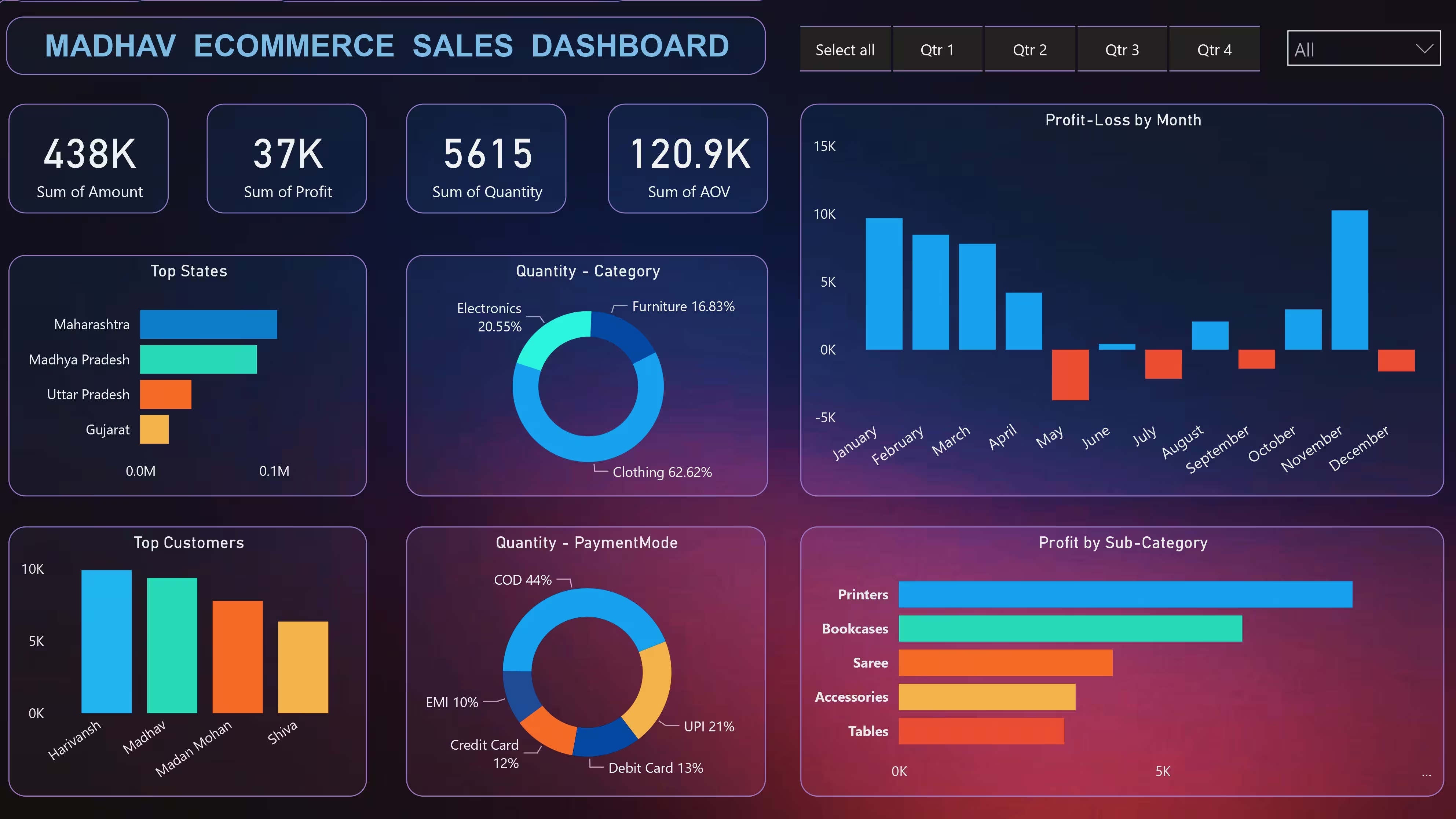
Figure 1: Comprehensive E-Commerce Dashboard Visualization. (Note: Data shown is for demonstration purposes only.)
1. Power BI for Global E-Commerce Analytics
In the competitive landscape of e-commerce, data is your most valuable asset. Power BI enables enterprise-level analytics by integrating multiple data silos into a unified view.
Multi-Source Integration
Connect seamlessly to Shopify, WooCommerce, and SQL databases using Power Query.
// Power Query Example
let
    Source = Shopify.Contents("https://store.api"),
    Orders = Source{[Name="Orders"]}[Data]
in
    Orders
Currency Normalization
Standardize global revenue into a single reporting currency using DAX.
// DAX Currency Conversion
Sales USD =
SUMX(
    Sales,
    Sales[Amount] * RELATED(ExchangeRates[Rate])
)
2. Data Architecture for Multi-Channel Sales
A robust data pipeline ensures accuracy and reliability. Below is the architecture used for the Madhav Dashboard:
| Data Source | Refresh Frequency | Data Volume | Purpose |
|---|---|---|---|
| Shopify API | Real-time (Stream) | 50K orders/day | Transactional Data |
| Google Analytics 4 | Hourly | 2M events/day | User Behavior |
| ERP (SQL) | Daily | Inventory/Cost | Margin Analysis |
3. Key Dashboard Components
Sales Performance
- GMV Growth Rate: Month-over-Month tracking.
- AOV (Average Order Value): Segmented by customer type.
- Cart Abandonment: Funnel analysis visual.
Customer Analytics
- LTV:CAC Ratio: Profitability index.
- Retention Rate: Cohort analysis.
- NPS Score: Customer satisfaction integration.
4. Advanced DAX Formulas for Sales
To go beyond basic sums, we utilize time-intelligence functions in DAX to reveal trends.
Rolling 28-Day Revenue
Rolling Revenue =
CALCULATE(
    SUM(Sales[Revenue]),
    DATESINPERIOD(
        Calendar[Date],
        LASTDATE(Calendar[Date]),
        -28,
        DAY
    )
)
This formula smooths out daily volatility to show the true direction of your sales trend.
5. Real-Time Inventory Management
Visualizing stock levels across global warehouses prevents stockouts and overstocking. The heatmap below allows logistics managers to spot issues instantly.

Figure 2: Heatmap showing stock density vs. regional demand.
6. Customer Lifetime Value (CLV)
Understanding the long-term value of a customer helps in setting accurate ad spend limits.
// CLV Calculation Measure
Customer LTV =
[Average Order Value] * [Purchase Frequency] * [Customer Lifespan]
7. Cross-Border Sales Analytics
Regional Performance
Isolate performance by economic zones to tailor marketing.
// Region-Specific Sales
EU Sales =
CALCULATE(
    [Total Sales],
    Customers[Region] = "Europe"
)
Logistics Efficiency
Track shipping partner performance to ensure customer satisfaction.
// On-Time Performance
On-Time % =
DIVIDE(
    [On-Time Deliveries],
    [Total Orders]
)
8. Actionable Business Insights
Data without action is noise. Here are the specific insights derived from this dashboard implementation:
Pricing Strategy
Identified that Premium products maintain a 22% higher margin despite lower volume. Recommended dynamic pricing strategies for 15 mid-range categories.
Marketing Optimization
ROAS increased by 40% by shifting budget from low-performing display ads to high-conversion Mobile App campaigns (68% conversion share).